

Overview
This manual describes the Verwaltung area of Zeiterfassung — the screens that team leads, HR and administrators use to check, correct and evaluate the times of other people.
The recording side for employees (Dashboard, Tageszeiten, Wochenzeiten) is not part of this manual.
The three areas
Section titled “The three areas”You reach every screen described here through the Verwaltung entry in the left-hand navigation bar. A click opens a flyout with three categories:
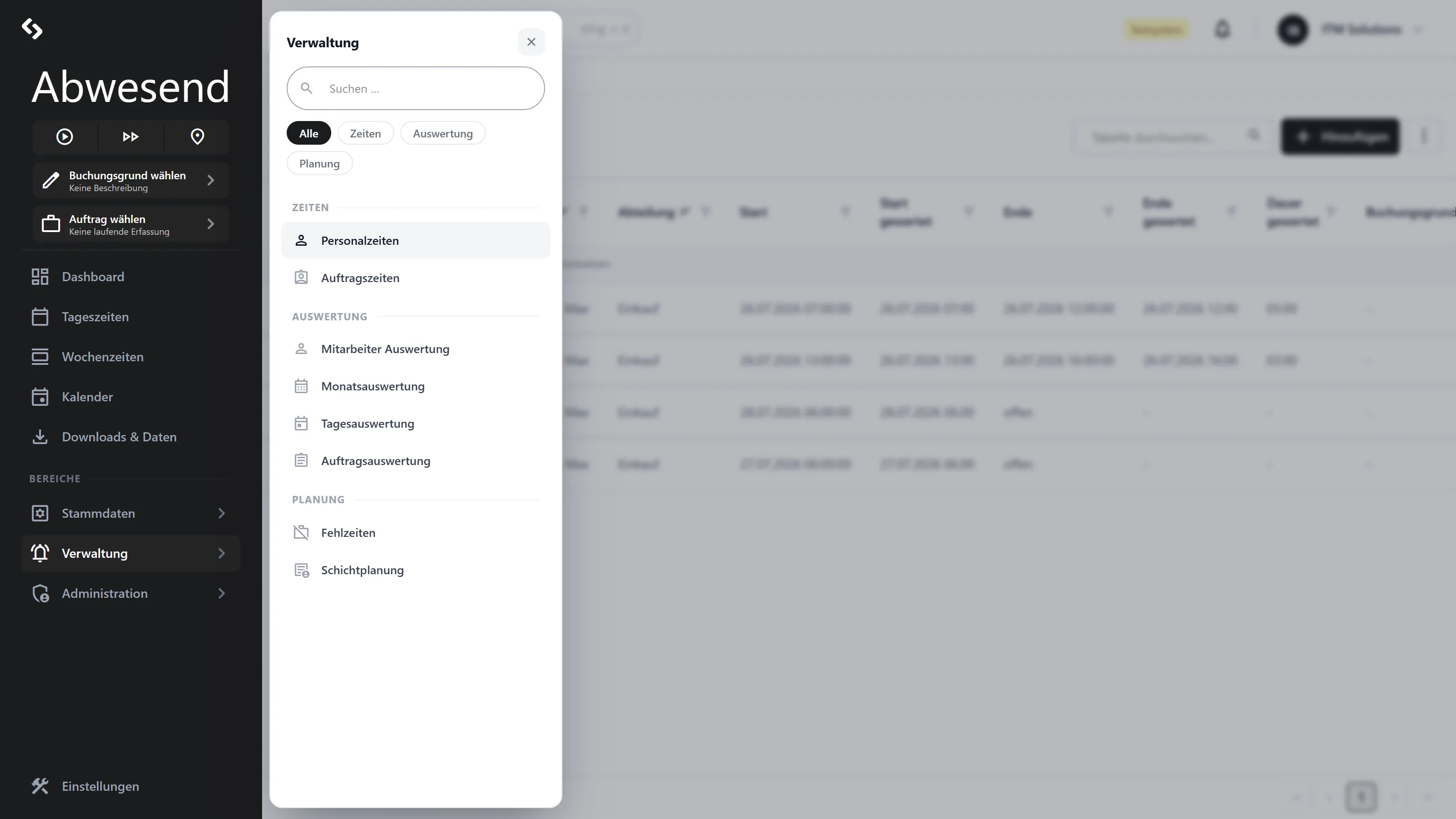
How the areas fit together
Section titled “How the areas fit together”It is worth understanding the underlying model once — it answers almost every question that comes up in practice.
flowchart LR
  T["Terminal · App · Web<br/>(employees book)"] --> P["Personalzeiten<br/><i>attendance</i>"]
  P --> B{{"Nightly<br/>evaluation"}}
  B --> TE["Tagesauswertung<br/><i>Soll · Ist · Saldo</i>"]
  TE --> ME["Monatsauswertung"]
  ME --> MA["Monatsabschluss<br/><i>freezes the month</i>"]
  P -. "portion" .-> A["Auftragszeiten<br/><i>project time</i>"]
  A --> AA["Auftragsauswertung"]
  F["Fehlzeiten<br/><i>Urlaub, Krank</i>"] --> B
In short:
- Personalzeiten are the raw data: “Ms Müller was on site from 08:00 to 17:00.”
- Auftragszeiten sit inside that attendance: “3.5 hrs of that on Auftrag 4711.”
- The Auswertungen do not show the raw data but the result of the evaluation — that is, what actually counted after breaks were deducted, after rounding, and taking the Tagesplan (daily schedule) and Fehlzeiten into account.
- The Monatsabschluss (month-end closing) freezes a month. After that, corrections are locked.
What you see depends on three things
Section titled “What you see depends on three things”This manual describes the full feature set. Your screen may look different:
| Factor | Effect |
|---|---|
| Rolle | Verwaltung only sees its own Abteilungen, Admin sees everything. See Roles & visibility. |
| Lizenz | Without the Auftragszeiterfassung module, Auftragszeiten and Auftragsauswertung are missing. Without Schichtplanung, the Schichtplanung is missing. |
| Konfiguration | Tagespläne, Fehlzeitenschlüssel (absence codes) and Buchungsgründe (booking reasons) are configured per Mandant — the selection lists look different in your system. |
Next steps
Section titled “Next steps”Screenshots are taken from a test tenant and show sample data. Your interface may differ depending on role, licence and configuration.