
Monatsauswertung
Verwaltung → Auswertung → Monatsauswertung
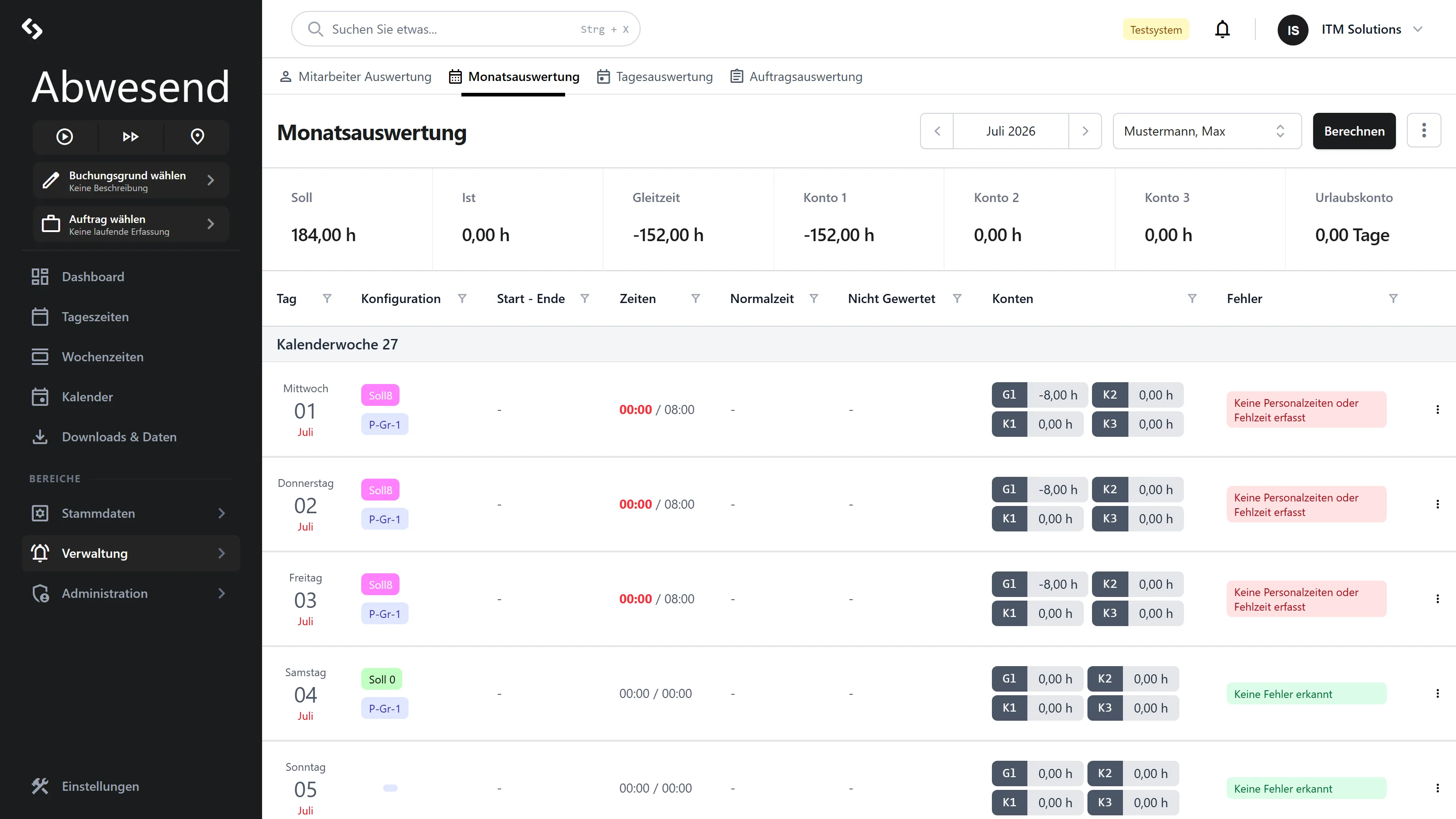
One row per calendar day, for one person. This screen answers: “Where exactly in the month did the discrepancies arise? On which days were there errors?”
It is the bridge between the workforce overview (Mitarbeiter Auswertung) and the individual day (Tagesauswertung).
Select first
Section titled “Select first”As long as neither an employee nor a month is selected, a grey veil lies over the screen: „Bitte wählen Sie einen Mitarbeiter aus”.
Two filters at the top:
- Monat — arrows for back/forward, a click opens a year grid.
- Mitarbeiter — contains only people who were active in that month.
The metrics bar
Section titled “The metrics bar”Seven tiles show this person’s monthly result: Soll, Ist, Gleitzeit, Konto 1,
Konto 2, Konto 3 — each in hours — and Urlaubskonto in days.
The columns
Section titled “The columns”| Column | Meaning |
|---|---|
Tag | Date tile. |
Konfiguration | Badges: Tagesplan and Pausengruppe (linked into the master data), where applicable Mehrarbeitsfreigabe, where applicable Überschrieben, plus one badge per Fehlzeit. |
Start - Ende | First Kommt and last Geht time. |
Zeiten | Ist / Soll as hh:mm. Red if below, green if above. |
Normalzeit | hh:mm, - if zero. |
Nicht Gewertet | Present, but not counted. |
Konten | Four badges: Gl (Gleitzeit), K1, K2, K3. |
Fehler | A red badge per detected problem — or a green Keine Fehler erkannt. |
Grouped by Kalenderwoche (calendar week), newest day at the top. There are no column filters in this tab.
A struck-through, grey Fehlzeit badge means that this absence is deactivated (rejected) and therefore does not count.
Actions
Section titled “Actions”Berechnen recalculates for the selected person — first the monthly, then the daily result. Locked without an employee selected.
⋮ Aktionen:
| Entry | Result |
|---|---|
| Report erstellen | Daily report as a PDF for the selected person. |
| Report für alle | Daily report for all employees. |
| Monatsübersicht (alle) | Monthly report for everyone. |
Without a selection, the system reports „Bitte wählen Sie zunächst einen Zeitraum und einen Mitarbeiter aus.”
Repairing a day
Section titled “Repairing a day”The context menu of a row:
| Group | Entry | Effect |
|---|---|---|
Tagesdaten | Details | Jumps to the Tagesauswertung for exactly this day and this person. |
Sonstiges | Freigeben | Sets the Mehrarbeitsfreigabe (overtime approval) and recalculates. |
Sonstiges | Überschreiben | Opens the day configuration for editing. |
Sonstiges | Zurücksetzen | Discards an override, back to the original planning. |
In a closed month, Freigeben fails with „Mehrarbeitsfreigabe konnte nicht gesetzt werden, Monat ist bereits abgeschlossen”. Zurücksetzen without a prior override reports „Daten konnten nicht zurückgesetzt werden”.
Tageskonfiguration überschreiben
Section titled “Tageskonfiguration überschreiben”The Tageskonfiguration überschreiben dialog lets you set, for this one day, a different
Tagesplan, a different Pausengruppe, deviating Sollstunden, a Tagesparametergruppe
and the Mehrarbeitsfreigabe.
Tagesplan, Pausengruppe and Mitarbeiter are mandatory — without them, Speichern
stays locked. The Sollstunden field does carry an asterisk, but it is not validated:
make sure the value is sensible yourself.
After saving, the system recalculates automatically.
Screenshots are taken from a test tenant and show sample data. Your interface may differ depending on role, licence and configuration.