

Tagesauswertung
Verwaltung → Auswertung → Tagesauswertung
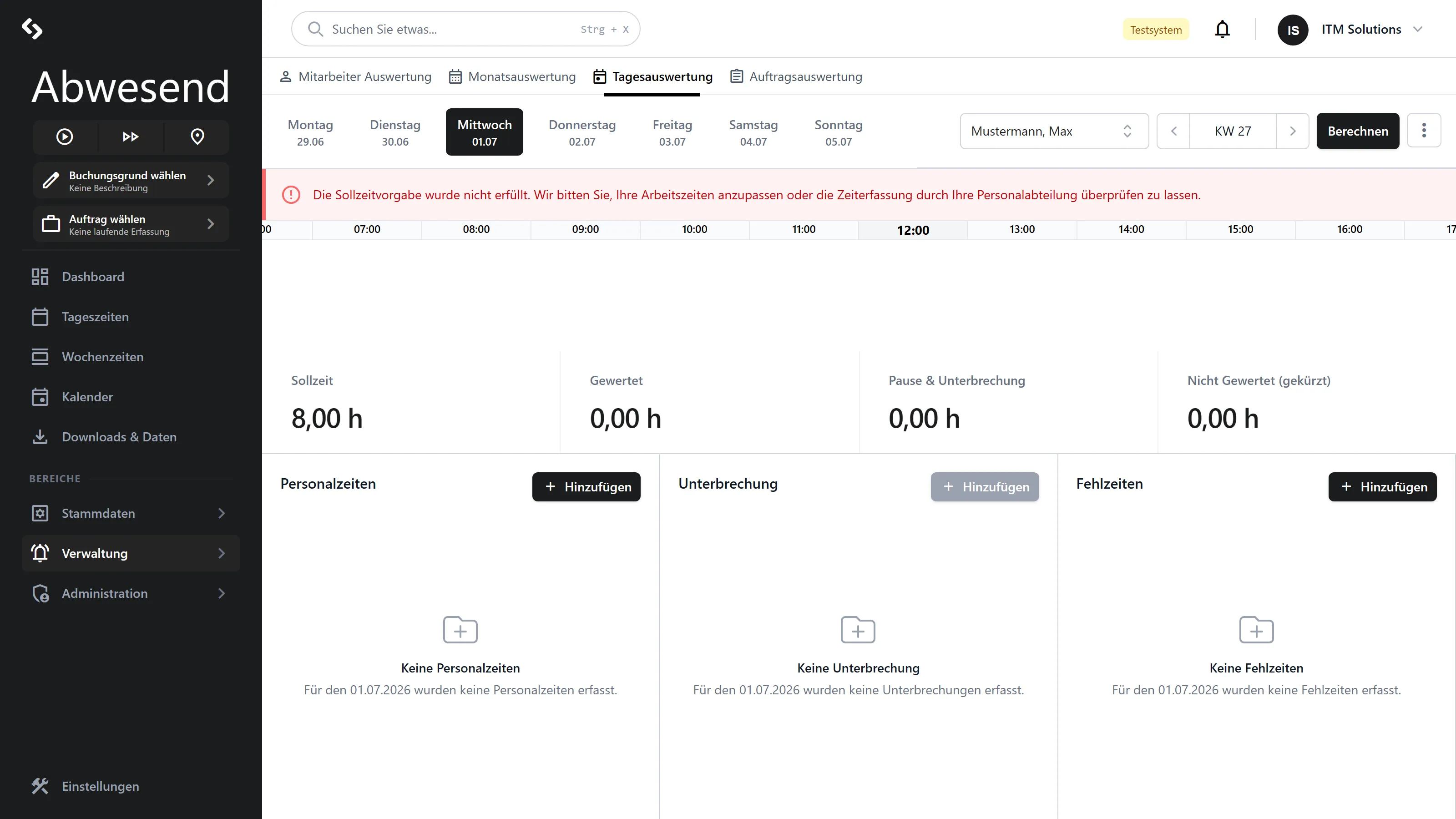
One day, one person. Not a table, but a timeline, four metrics and three lists. This screen answers: “What actually happened on this day, and why does this Ist time come out of it?”
This is the repair bench: this is where you really do create Personalzeiten, Unterbrechungen and Fehlzeiten.
Navigating
Section titled “Navigating”On the left there is a weekday bar (Monday–Sunday) — one click switches the day. On the right you choose the Mitarbeiter and, via the week navigator, the week.
Without an employee selected, a grey veil lies over the screen.
The alerts at the top
Section titled “The alerts at the top”| Alert | Meaning |
|---|---|
| Red alert | A detected problem, e.g. Sollzeit Verletzung or Personalzeit Offen. |
| Blue alert | There is an absence on this day — e.g. Urlaub. |
The timeline
Section titled “The timeline”Four rows, one above the other:
| Row | Content |
|---|---|
| Personalzeit | The attendance. Draggable if correction is allowed. |
| Gewertet / Nicht gewertet | How much of it counted. Not draggable. |
| Pause | Breaks and deductions. Not draggable. |
| Auftragszeit | Project times. Draggable with the Auftragszeiterfassung module. |
Comparing rows 1 and 2 is the quickest route to the question “why doesn’t this count?”.
The four metrics
Section titled “The four metrics”| Tile | Meaning |
|---|---|
Sollzeit | What the Tagesplan specifies. |
Gewertet | What actually counted. |
Pause & Unterbrechung | Break time + deductions + interruptions together. |
Nicht Gewertet (gekürzt) | Present, but not counted. |
If Nicht Gewertet is conspicuously high, that is usually a case for the
Mehrarbeitsfreigabe.
The three lists
Section titled “The three lists”Personalzeiten
Section titled “Personalzeiten”Hinzufügen creates an attendance record. An entry is called Personalzeit (Offen)
when the Geht booking is missing.
Deleting asks for confirmation: „Möchten Sie diese Personalzeit wirklich löschen?”
Unterbrechung
Section titled “Unterbrechung”Hinzufügen is locked as long as no Personalzeit exists — an interruption needs something to interrupt. Create the Personalzeit first.
Fehlzeiten
Section titled “Fehlzeiten”Hinzufügen creates an absence for this day (Urlaub, Krank …).
Clicking an existing entry leaves the screen and jumps to the Fehlzeitenkalender.
Berechnen
Section titled “Berechnen”Berechnen triggers the re-evaluation for the selected person. Necessary after every correction — the metrics do not change by themselves.
Reports
Section titled “Reports”⋮ Aktionen → Report erstellen (selected person) or Report für alle. The result
is a PDF Tagesdaten_JJJJ-MM.pdf.
Typical repairs
Section titled “Typical repairs”-
„Personalzeit Offen” — somebody did not clock out. Click the entry, set
Ende, save, Berechnen. -
„Sollzeit Verletzung” — time is missing. Either add a Personalzeit, or enter a Fehlzeit (Urlaub/Krank), or override the target time in the Monatsauswertung.
-
„Ungewertet” / a high Nicht-Gewertet time — somebody was there longer than the Tagesplan provides for. If that was intended: grant the Mehrarbeitsfreigabe.
-
„Auftragszeit-Verteilung” — too little attendance has been booked to orders. Add the missing Auftragszeiten.
Granting the Mehrarbeitsfreigabe
Section titled “Granting the Mehrarbeitsfreigabe”You do not set the approval here, but in the Monatsauswertung (context menu → Freigeben) or under Fehlerhafte Zeiten (context menu → Mehrarbeitsfreigabe). After that, the additional time is counted.
Screenshots are taken from a test tenant and show sample data. Your interface may differ depending on role, licence and configuration.