

Mitarbeiter Auswertung
Verwaltung → Auswertung → Mitarbeiter Auswertung
One row per employee, for one month. This screen answers: “How does each person stand this month — target met? Flexitime balance? Account balances? Remaining holiday?”
It is also the place where the month is calculated, closed and exported to DATEV. There is deliberately no employee filter — you always see every person visible to you.
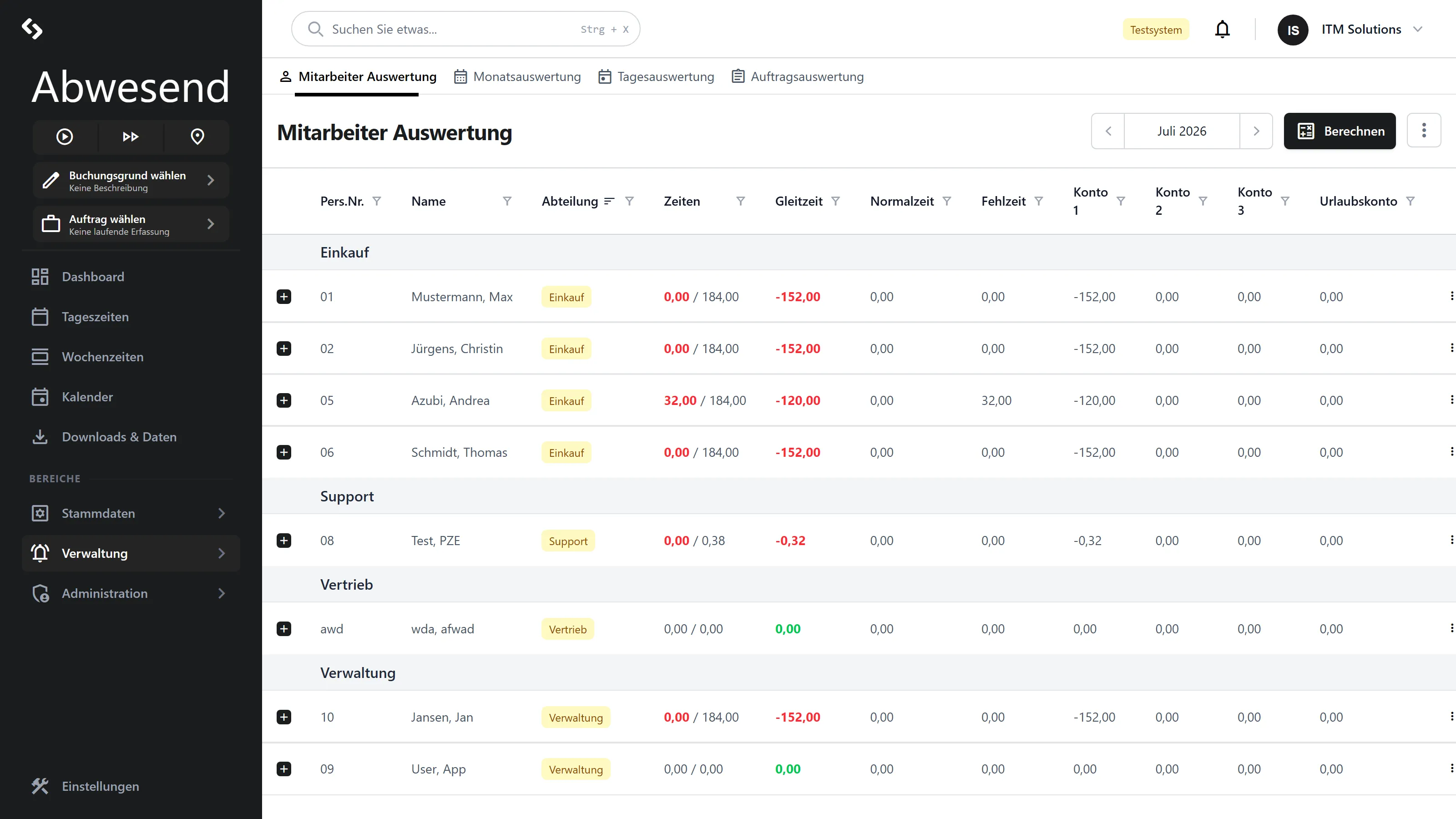
The columns
Section titled “The columns”| Column | Meaning |
|---|---|
Pers.Nr. | Personnel number. |
Name | The employee’s search abbreviation. |
Abteilung | Shown as a badge. Without an assignment, a red Nicht Zugeordnet appears. |
Zeiten | Ist / Soll (actual / target). Red if the target has not been reached; green if it has been exceeded. |
Gleitzeit | The balance for the month. Red if negative. |
Normalzeit | Total of the Normalzeit portions. |
Fehlzeit | Total of the evaluated absences (Urlaub, Krank …). |
Konto 1 to Konto 3 | Account balances including the carry-over from the previous month. |
Urlaubskonto | Remaining holiday in days — not in hours. |
All time values here are given in industrial hours (decimal hours): 1,50 means one and
a half hours, not one hour fifty. In the
Monatsauswertung, by contrast, the very same Zeiten
column is formatted as hh:mm — a known inconsistency that you should watch out for.
By default, the list is grouped by Abteilung.
The month: calculating and closing
Section titled “The month: calculating and closing”Badges in the top right show the state of the selected month:
| Badge | Meaning |
|---|---|
Korrigierbar (yellow) | The last closed month. Only Nachkorrektur is still possible. |
Abgeschlossen (red) | The month is closed. No full editing any more. |
Berechnen
Section titled “Berechnen”The Berechnen button recalculates the monthly result for all employees. It is locked when the month is closed.
Monat abschließen
Section titled “Monat abschließen”In the ⋮ Aktionen menu → Monat abschließen.
DATEV-Export
Section titled “DATEV-Export”In the ⋮ Aktionen menu → DATEV-Export. This opens a dialog with three target formats:
| Tile | Meaning |
|---|---|
| DATEV (LuG) | Lohn und Gehalt (payroll and salary). |
| DATEV (LODAS) | LODAS. |
| DATEV-Profile | Export via the configured export profiles. |
The monthly result is updated automatically before the export. The result is a file
Zeiterfassung_Export_JJJJMM.dat.
Correcting
Section titled “Correcting”The context menu of a row depends on whether the month is open.
Month open:
| Group | Entry | Purpose |
|---|---|---|
Buchungskonten | Umbuchen | Move time from one account to another, using an Umbuchungsschlüssel (transfer key). |
Korrektur | Urlaubskonto | Correct holiday days directly. |
Korrektur | Konto 1, Konto 2, Konto 3 | Correct the account balance directly. |
Month closed and it is the last one: only Nachkorrektur.
Month closed, but not the last one: no context menu.
The units trap
Section titled “The units trap”The dialog works out Zeitziel = Zeitquelle × Faktor automatically; the target field is not
editable. Bemerkung is a mandatory field — no transfer without a reason.
Nachkorrektur
Section titled “Nachkorrektur”Only on the last closed month. You enter Konto 1, Konto 2, Konto 3 (in hours) and
Urlaubskonto (in days) directly.
Drilldown: where the numbers come from
Section titled “Drilldown: where the numbers come from”The + on a row expands two panels.
Monatsumbuchungen — every booking that has changed the month:
| Column | Meaning |
|---|---|
Pos. | 0 or -1 = automatic booking, ≥ 1 = manual booking. |
Quelle / Ziel | From which account to which. |
Zeit | For target U in days, otherwise in hours. |
Bemerkung | Your reason. |
A delete icon appears only for manual bookings (Pos ≥ 1). Automatic bookings are
deleted and recreated on every Berechnen — manual bookings survive. That is why you
cannot delete automatic bookings at all: they would come back with the next calculation
anyway.
When you delete a transfer, the system asks for confirmation („Diese Aktion kann nicht rückgängig gemacht werden.”) and recalculates the month afterwards.
Lohnarten Ergebnis — the breakdown by wage type, with Typ, Summe and Tage.
Screenshots are taken from a test tenant and show sample data. Your interface may differ depending on role, licence and configuration.